Hexagonal Architecture in React: A Practical Guide 🏗️
Learn how to apply Hexagonal Architecture in your frontend apps to build scalable, testable, and framework-agnostic codebases.
- Date

Hello everyone! 👋
Have you ever opened a project and found React hooks mixed with API calls, business logic inside components, and state management scattered everywhere? Or worse: tried to migrate from one framework to another and ended up rewriting the entire app? 😱
If so, you’re not alone. Frontend applications have grown exponentially in complexity, but our architectural practices haven’t always kept up. Today we’re going to talk about a pattern that can change the way you think about frontend code: Hexagonal Architecture.
What is Hexagonal Architecture? 🤔
Hexagonal Architecture, also known as Ports and Adapters, was introduced by Alistair Cockburn. The core idea is simple but powerful: separate your application’s core logic from external concerns.
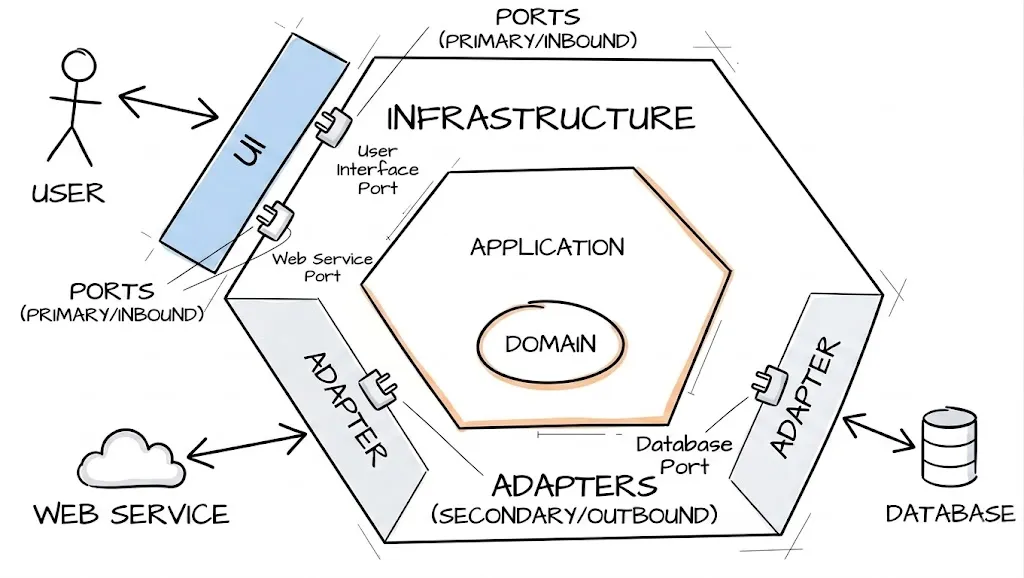
Imagine your application as a hexagon:
- Inside the hexagon: your domain — business logic, use cases, models.
- Outside the hexagon: infrastructure — UI frameworks, HTTP clients, databases, localStorage, etc.
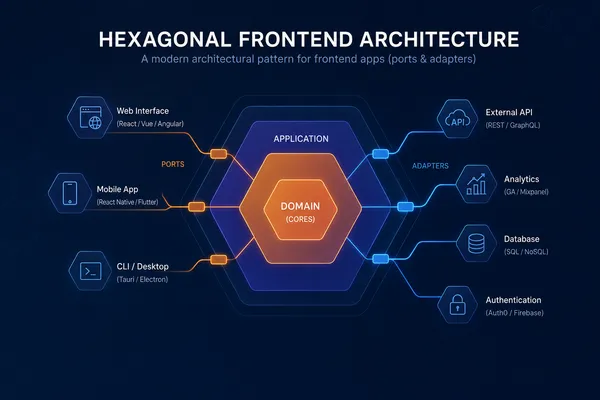
The hexagon communicates with the outside world through ports (interfaces) and adaptations (implementations). This means your core logic doesn’t care if you’re using React, Vue, Angular, or even running in Node.js.
Why “Hexagonal”?
The hexagon is just a visual metaphor. It could be a pentagon, an octagon, or any shape. The important thing is that each side represents a different way your application interacts with the outside world: user interface, API calls, storage, messaging, etc.
The beauty of the hexagon is that it has enough sides to illustrate multiple integration points while remaining visually simple.
The Layers Explained 🧅
Let’s break down the main layers:
1. Domain Layer (Inside the Hexagon)
This is the heart of your application. It contains:
- Models: Pure data structures representing your business entities.
- Use Cases: Application-specific business rules. What can the user do?
- Repository Interfaces (Ports): Contracts that define how to access data, not where it comes from.
// domain/models/Product.ts
export interface Product {
  id: string
  name: string
  price: number
  category: string
}

// domain/models/Cart.ts
import { Product } from './Product'

export interface Cart {
  id: string
  items: CartItem[]
}

export interface CartItem {
  product: Product
  quantity: number
}
2. Ports (Interfaces)
Ports are the contracts between your domain and the outside world. They define what your domain needs, not how it’s implemented.
// domain/ports/ProductRepository.ts
import { Product } from '../models/Product'

export interface ProductRepository {
  getAll(): Promise<Product[]>
  getById(id: string): Promise<Product | null>
}

// domain/ports/CartRepository.ts
import { Cart } from '../models/Cart'

export interface CartRepository {
  getCart(userId: string): Promise<Cart>
  addItem(userId: string, productId: string, quantity: number): Promise<Cart>
  removeItem(userId: string, productId: string): Promise<Cart>
}
3. Use Cases
Use cases orchestrate the business logic. They depend only on ports (interfaces), never on concrete implementations.
// domain/usecases/AddProductToCart.ts
import { CartRepository } from '../ports/CartRepository'
import { ProductRepository } from '../ports/ProductRepository'

export class AddProductToCart {
  constructor(
    private cartRepository: CartRepository,
    private productRepository: ProductRepository,
  ) {}

  async execute(userId: string, productId: string, quantity: number) {
    const product = await this.productRepository.getById(productId)
    if (!product) {
      throw new Error('Product not found')
    }

    if (quantity <= 0) {
      throw new Error('Quantity must be greater than zero')
    }

    return this.cartRepository.addItem(userId, productId, quantity)
  }
}
4. Infrastructure Layer (Outside the Hexagon)
This is where all the concrete implementations live:
- Adapters: Implementations of your ports.
- UI Components: Framework-specific code (React, Vue, Angular…).
- HTTP Clients: Axios, fetch wrappers, GraphQL clients.
- Storage: localStorage, IndexedDB, cookies.
// infrastructure/repositories/HttpProductRepository.ts
import { ProductRepository } from '../../domain/ports/ProductRepository'
import { Product } from '../../domain/models/Product'
import { HttpClient } from '../http/HttpClient'

interface ProductDTO {
  id: string
  name: string
  price: number
  category: string
}

export class HttpProductRepository implements ProductRepository {
  constructor(private http: HttpClient) {}

  async getAll(): Promise<Product[]> {
    const dtos = await this.http.get<ProductDTO[]>('/api/products')
    return dtos.map(this.toDomain)
  }

  async getById(id: string): Promise<Product | null> {
    const dto = await this.http.get<ProductDTO>(`/api/products/${id}`)
    return dto ? this.toDomain(dto) : null
  }

  private toDomain(dto: ProductDTO): Product {
    return {
      id: dto.id,
      name: dto.name,
      price: dto.price,
      category: dto.category,
    }
  }
}
Dependency Injection: The Glue 🧩
Dependency Injection (DI) is the technique that makes all of this work. Instead of your use cases creating their own dependencies, you inject them from the outside.
// infrastructure/di/Container.ts
import { HttpProductRepository } from '../repositories/HttpProductRepository'
import { HttpCartRepository } from '../repositories/HttpCartRepository'
import { AxiosHttpClient } from '../http/AxiosHttpClient'
import { AddProductToCart } from '../../domain/usecases/AddProductToCart'

// Create infrastructure instances
const httpClient = new AxiosHttpClient('https://api.example.com')
const productRepository = new HttpProductRepository(httpClient)
const cartRepository = new HttpCartRepository(httpClient)

// Inject into use cases
export const addProductToCart = new AddProductToCart(
  cartRepository,
  productRepository,
)
In frameworks like Angular, DI is built-in. In React or Vue, you can use libraries like tsyringe, inversify, or simply create your own container.
The beauty of DI is that you can easily swap implementations:
// For testing
const mockProductRepository = new MockProductRepository()
const addProductToCart = new AddProductToCart(
  cartRepository,
  mockProductRepository,
)

// For a different API
const fetchHttpClient = new FetchHttpClient('https://other-api.com')
const productRepository = new HttpProductRepository(fetchHttpClient)
Why This Matters for Frontend 🎯
You might be thinking: “This looks like backend stuff. Why should I care as a frontend developer?”
Here’s why:
1. Framework Independence
Your business logic doesn’t know about React, Vue, or Angular. If you need to migrate from React to Vue (or add a React Native app), your domain stays the same. Only the UI layer changes.
2. Testability
Testing becomes trivial. You can test your use cases with mock repositories without rendering any UI:
// tests/usecases/AddProductToCart.test.ts
describe('AddProductToCart', () => {
  it('should add a product to the cart', async () => {
    const mockCartRepo: CartRepository = {
      getCart: jest.fn(),
      addItem: jest.fn().mockResolvedValue({ id: '1', items: [] }),
      removeItem: jest.fn(),
    }
    const mockProductRepo: ProductRepository = {
      getAll: jest.fn(),
      getById: jest
        .fn()
        .mockResolvedValue({ id: 'p1', name: 'Test', price: 10 }),
    }

    const useCase = new AddProductToCart(mockCartRepo, mockProductRepo)
    const result = await useCase.execute('user1', 'p1', 1)

    expect(mockCartRepo.addItem).toHaveBeenCalledWith('user1', 'p1', 1)
  })
})
3. Maintainability
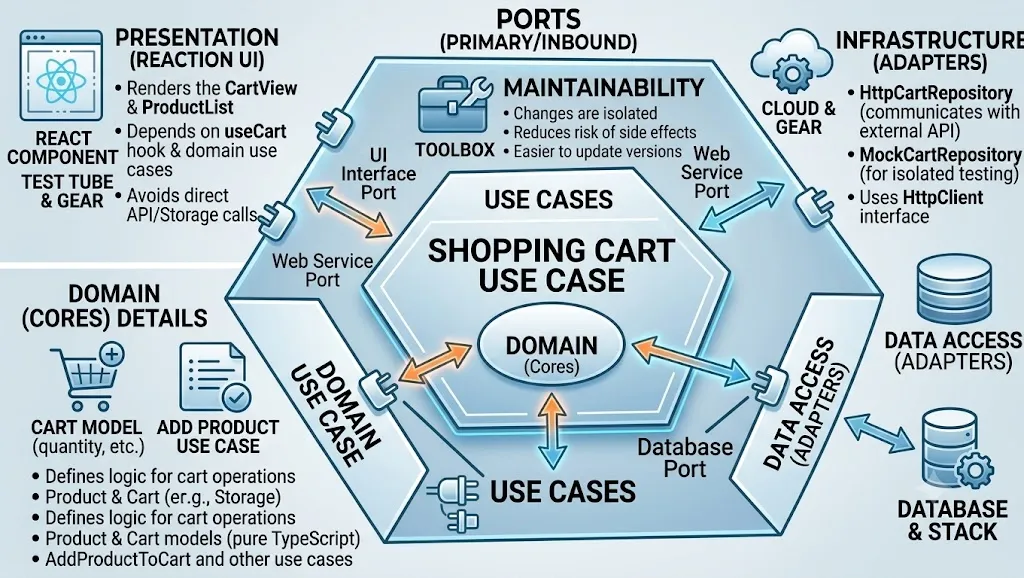
When the API changes, you only update the adapter. When the business logic changes, you only update the use case. Each change is isolated.
4. Team Scalability
Different team members can work on different layers without stepping on each other’s toes. The domain expert works on use cases, the designer works on UI components, and the backend developer works on adapters.
A Practical Example: Shopping Cart 🛒
Let’s see how all the pieces fit together in a real component:
// presentation/components/ProductList.tsx
import { useEffect, useState } from 'react'
import { Product } from '../../domain/models/Product'
import { GetAllProducts } from '../../domain/usecases/GetAllProducts'
import { AddProductToCart } from '../../domain/usecases/AddProductToCart'

interface ProductListProps {
  getAllProducts: GetAllProducts
  addProductToCart: AddProductToCart
}

export function ProductList({
  getAllProducts,
  addProductToCart,
}: ProductListProps) {
  const [products, setProducts] = useState<Product[]>([])
  const [loading, setLoading] = useState(true)

  useEffect(() => {
    getAllProducts
      .execute()
      .then(setProducts)
      .finally(() => setLoading(false))
  }, [getAllProducts])

  const handleAddToCart = async (productId: string) => {
    try {
      await addProductToCart.execute('current-user', productId, 1)
      alert('Product added to cart!')
    } catch (error) {
      alert(error.message)
    }
  }

  if (loading) return <div>Loading...</div>

  return (
    <div className="product-list">
      {products.map((product) => (
        <div key={product.id} className="product-card">
          <h3>{product.name}</h3>
          <p>${product.price}</p>
          <button onClick={() => handleAddToCart(product.id)}>
            Add to Cart
          </button>
        </div>
      ))}
    </div>
  )
}
Notice how the component doesn’t know where the data comes from. It could be an HTTP API, a mock for testing, or a local database. The component only knows about use cases.
Project Structure 📁
Here’s how you might organize your files:
src/
├── domain/
│   ├── models/
│   │   ├── Product.ts
│   │   └── Cart.ts
│   ├── ports/
│   │   ├── ProductRepository.ts
│   │   └── CartRepository.ts
│   └── usecases/
│       ├── GetAllProducts.ts
│       └── AddProductToCart.ts
├── infrastructure/
│   ├── http/
│   │   ├── HttpClient.ts
│   │   ├── AxiosHttpClient.ts
│   │   └── FetchHttpClient.ts
│   ├── repositories/
│   │   ├── HttpProductRepository.ts
│   │   └── HttpCartRepository.ts
│   └── di/
│       └── Container.ts
└── presentation/
    ├── components/
    │   ├── ProductList.tsx
    │   └── CartView.tsx
    └── hooks/
        └── useCart.ts
Common Pitfalls ⚠️
1. Over-Engineering
Not every small project needs full hexagonal architecture. If you’re building a simple landing page or a small internal tool, the overhead might not be worth it. Use your judgment.
2. Leaking Infrastructure into Domain
Your domain models should be plain objects. Don’t use framework-specific decorators or types in your models.
// ❌ Bad: Using React-specific types in domain
export interface Product {
  id: string
  renderCard: () => JSX.Element // No!
}

// ✅ Good: Pure domain model
export interface Product {
  id: string
  name: string
  price: number
}
3. Forgetting the Ports
Some developers skip the port (interface) and directly use the adapter in use cases. This defeats the purpose. Always define the contract first.
When to Use Hexagonal Architecture 🚦
✅ Use it when:
- Your application has complex business logic.
- You need to support multiple platforms (web, mobile, desktop).
- You want high testability.
- Your team is growing and needs clear boundaries.
- You anticipate migrating frameworks in the future.
❌ Consider alternatives when:
- You’re building a simple CRUD app with minimal logic.
- The project is a prototype or MVP that needs to ship fast.
- Your team is small and the overhead isn’t justified.
Conclusion
Hexagonal Architecture isn’t about following a rigid set of rules. It’s about thinking about boundaries, dependencies, and separation of concerns. It’s about asking: “Should this code know about React?” (Usually, the answer is no).
By separating your domain from your infrastructure, you create code that is:
- Testable: Mock the outside, test the inside.
- Migratable: Swap frameworks without rewriting business logic.
- Maintainable: Changes are isolated to specific layers.
- Scalable: Different teams can own different layers.
The next time you start a frontend project, consider spending 30 minutes designing your architecture before writing code. Your future self (and your team) will thank you.
Until next time, happy coding! 👨💻👩💻
Peace ✌️